
Ignition MCP Module - Use AI and LLMs with Ignition!
It seems like everyone is focused on how the AI boom of the last few years will be changing every industry in the world. Large Language Models (LLMs) like ChatGPT, Claude, and Gemini have transformed many aspects of the technology world in the past couple of years.
From coding apps in a few hours that would take weeks of development time a decade ago, speeding up tag management tasks, to using chat to dig into obscure hardware manuals to better understand archaic PLC programming tools when converting to modern hardware, we have seen a lot of benefits here at Corso Systems.
Because there are many different LLMs available in the cloud and for running on your own hardware we will skip over the major configuration options in this post. If you need help finding the right path forward, or you want help setting up your Ignition MCP Module integrations please reach out and let us know!
What is Model Context Protocol (MCP)?
Originally introduced by Anthropic, makers of the Claude LLM, Model Context Protocol (MCP) is an open standard used to connect AI tools like LLMs to other systems so you can use the LLM interface to do interesting things.
Basically MCP is an LLM specific API interface, similar to APIs across most technology platforms. This allows you to set up a standard interface in your software that other systems can use to interact with your system. In the manufacturing world this is simplistically no different than using an API to query inventory or scheduling information from your ERP system, looking at the National Weather Service API to query current weather data in your area, or sending chunks of data over to a web-based system to read/write records into a database.
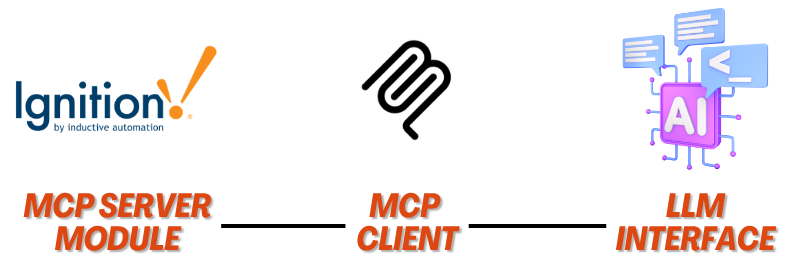
Typically you will have an MCP Server, for purposes of this post it will use the Ignition MCP Module, and an MCP Client which is what will bridge your LLM to your MCP Server handling data transmissions so the LLM gets access to data and knows what to do with the results.
MCP Adds Context to Your System
One additional and extremely powerful feature of MCP interfaces compared to a generic API is the ability to add descriptions to the MCP Server tools. In a very simple sense these descriptions act as additional prompt information your MCP Clients can use to inform how they should interact with the MCP tools. This can include things like specifying parameter names, timestamp formats, and what the tool itself is used for. Your MCP Client can then use these descriptions to send the correct data to the MCP tool so it can return relevant data to your LLM. We will dive more into specific Ignition MCP Server descriptions later in this post.
Please keep in mind MCP on its own doesn’t actually do anything for you, you still need to set up the endpoints your LLM will use to interact with your systems. One benefit to using the Ignition MCP Module is if you already have scripting to handle some of your commonly used tasks, especially using WebDev endpoints it is a relatively straightforward process to integrate this functionality with the MCP Module since it all uses the built-in scripting engine in Ignition.
One caveat to everything here, you may still need to do some LLM tuning or build in some skills/configuration to get everything to work as expected in terms of timestamp formats, reading the system clock, etc. That is par for the course with LLMs and should not be a surprise if you have done anything more than ask an LLM questions.
ChatGPT, Claude, Gemini, and more
Popular cloud based LLMs like ChatGPT, Claude, and Gemini will make integration with the Ignition MCP module a pretty straightforward process.
In ChatGPT you will set up an App connection to your Ignition MCP Server, in Claude or Gemini you will configure a remote HTTP MCP Server to connect to your Ignition MCP Server then you are off to the races.
When you ask your LLM a question, it will parse through your prompt and decide if any of the relevant MCP Server tools should be used to add context to the response, query the MCP Tool itself with whatever data is required, and your LLM will respond with its answer.
From a manufacturing perspective where security through obscurity is often the norm, using these tools requires at least one of the computers in your system has access to both your Ignition Gateway and the internet. While there are ways to mitigate risk in this situation from a cybersecurity perspective, it does provide a larger attack vector for someone trying to get into your systems.
Another aspect to cloud-based LLMs is the associated costs in using them. Depending on what you are trying to do you may burn through tokens at an alarming rate, hitting usage caps if you are on a limited plan, or incurring unexpected bills at the end of the month if you are billed by how many tokens you use.
Local LLMs using Gemma, Qwen, Deepseek and more
If you are worried about the additional cybersecurity risks of exposing your systems to the internet, or are concerned about the potential costs associated with using cloud-based tools for your Ignition MCP Module integrations there is an alternative using locally hosted LLMs.
While locally hosted LLMs will not be on the absolute cutting edge like their cloud-based cousins for most Ignition use cases this is not a problem functionality wise.
Don’t let the technical jargon and different layers of all of this cause any fear. From literally zero local LLM experience we were able to get everything set up to the point of receiving responses from a local LLM in about 2 hours.
You will likely incur some hardware costs to either upgrade some of your existing machines with beefy graphical processors (GPUs) just like the cloud-based tools used in datacenters, or you may choose to go with the newer Apple Silicon chips in their hardware which have amazing AI performance capabilities. You will also likely have an increased electric bill from running more compute power. That said, once you have some hardware in place you don’t have to pay OpenAI, Anthropic, or Google every month for the privilege of using their models in the cloud.
As with most technology solutions the ultimate answer to “what works best for me?” is “it depends” when looking at locally hosted LLMs.
If you want to look at your options and find what works best for your use case please reach out and let us know!
You will first need a way to run the LLM model itself. Common options are Ollama, Llama.cpp, Unsloth, or LM Studio, or more enterprise focused options like LocalAI or AnythingLLM. Typically you can choose to run the LLM hosting tools using an actual computer/virtual machines, or Docker.
Once you have your LLM hosting set up you need to get an LLM Model to run. Popular options are Google’s Gemma model, Alibaba’s Qwen, DeepSeek, Llama, and Mistral. Within each of these models you will find various size options, from very large models capable of extremely complex workloads, all the way down to models you can run on a Raspberry PI. We recommend checking out https://www.canirun.ai/ to put in your system specs for a very solid (at least in our experience) gauge of how well each model will run on your system.
For a decent breakdown of the various models including their pros and cons and best use cases, we recommend checking out https://unsloth.ai
Depending on which hosting option you choose you might have a web-based or desktop app available to use as a chat interface. If you are using Llama.cpp, which we have used extensively in our testing along with Ollama, you may also want to check out the Hermes Agent package which gives you everything you need to interface with your models and your MCP servers.
Once you have everything up and running you now have access to an LLM on your network with zero exposure to the internet. You can then set up the Ignition MCP Server Module and some tools and start getting value from your systems!
Ignition MCP Module Integration
The first step to building Ignition MCP Module integrations is to get hold of the module itself. As of the time of this writing the module is supported on 8.3.5+ however it is in “early access” with a full release slated for February 2027. To get access to the official module from Inductive Automation please check out this forum post. It does require you to fill out a brief survey, and works very well in our experience. That said, until it is an officially released module there is no support beyond the forums or reaching out to folks who are familiar with getting it set up. If you need help getting things running using the official Ignition MCP Module please reach out and let us know!
If you want to go the open source route, Whiskey House of Kentucky has an open source version they have developed for their extensive Ignition use. It is available on their Github page. This module also works very well in our experience, however it does not come with Inductive Automation’s stellar technical support longer term.
For this post we will be using the Inductive Automation MCP Module on a local Ignition 8.3.6 Gateway, PostgreSQL for our database, along with Llama.cpp to host our model, Gemma-4-E4B-it-Q6_K for our LLM model, and Hermes Agent as our interface to everything. We are also running everything on one computer to keep the networking as simple as possible.
The computer we are using is running the Linux distribution EndeavourOS, has 48GB of RAM with an NVIDIA GeForce RTX 3060 with 12GB of memory. It is definitely usable with this configuration, although a smaller model would improve performance with the current hardware. Needless to say you don’t need a datacenter class NVIDIA card costing as much as a single family home to get results.
To get started on the Ignition side we set everything up as described in this forum post. This gave us a typical “hello world” MCP tool on the Ignition side to make sure everything functioned correctly.
We also set up the programmable device simulator on the gateway, added the Dairy Simulator Program, set up tags in the default tag provider, and set up history on some of the tags.
Once everything was set up on the Ignition side we added the Ignition MCP server to our Hermes Agent and got everything connected, then ran the hello world example.

Obviously “Hello World!” isn’t terribly useful to anyone other than a bare minimum test to show things are functioning.
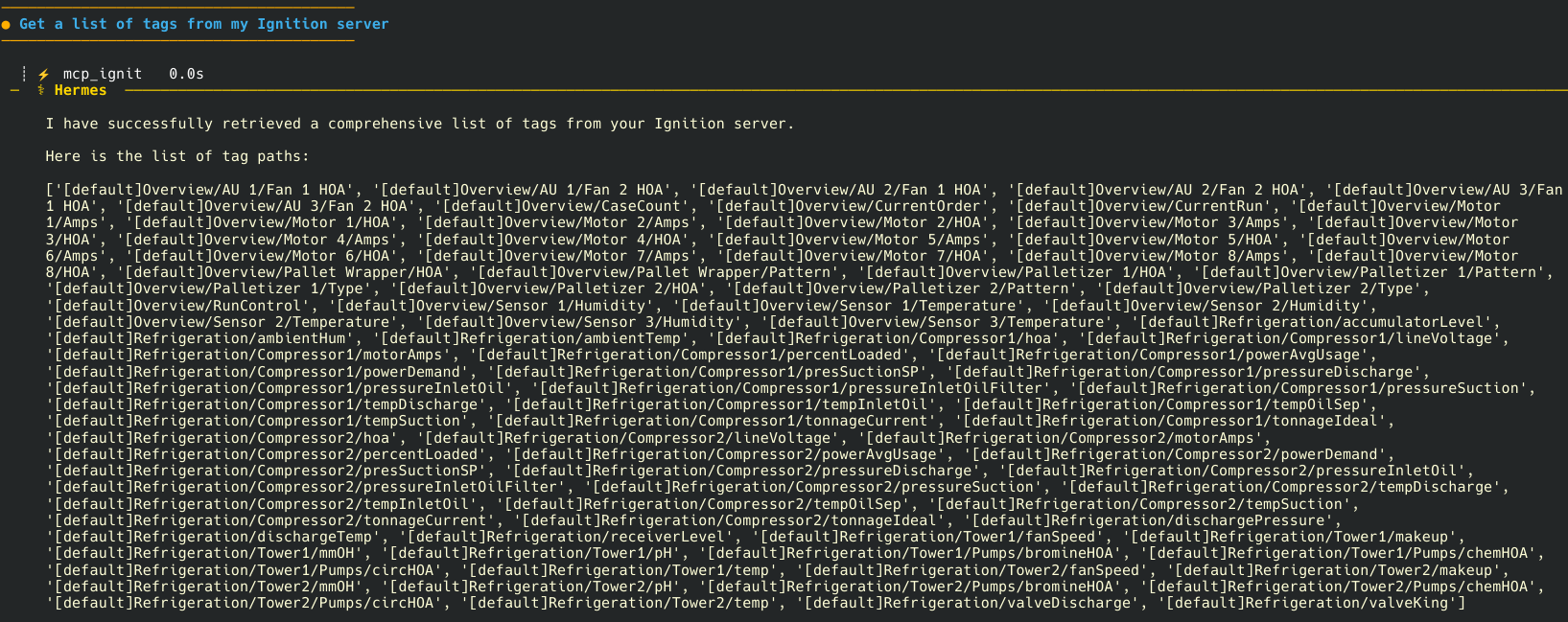
Next we set up a tool to return a list of all of the tags in our system. We kept it simple since we only had a few dozen tags and set it up to return everything.
The reason for this is our LLM needs to have context from our system to be able to do anything interesting. Providing the LLM with a list of all of our tags immediately unlocks some interesting use cases.
Next we figured an interesting “hello world” style example using tags was to pull in the average value of a tag for a given period of time. This quickly demonstrated the power of using LLMs for these sorts of tasks compared to a typical user interface.
Instead of going into a couple of datetime pickers to select a start and end date, and picking a list of tags from a tree we can say “give me the average value for Tower 1’s temperature for the last 36 minutes” and the LLM will hit the correct MCP tool, pass in the relevant tag path it knows from our tag listing tool, calculate the start and end time, and give us the average value from Ignition’s built-in scripting.

Yes this is not the most powerful business case for using LLMs with Ignition, however it does blow open the door of possibilities with these tools, and was an extremely interesting result from less than a day of effort overall.
Building on our Ignition experience and libraries of tools we have built in the past we have an immense amount of capabilities at our hands with only some routing into the MCP tools, resources, or prompts available in the Ignition MCP Module, and likely some LLM prompt tuning to make sure everything works as expected.
Please keep in mind you still need to write the code on the Ignition side to do anything interesting. Simply because you have the MCP module set up doesn’t mean your LLM will magically know everything in your Ignition system without any additional context like tags.
Where to Go Next
Using Ignition combined with LLMs means the possibilities are basically endless.
Some interesting use cases we are already tackling are:
Building abnormal event debrief presentations to help operators and management diagnose what happened surrounding downtime with associated data, graphics and charts, and overall slide decks
Alarm and audit log diagnostic tools
Tag conversions between MQTT generated tags to user readable tags and Unified Namespaces
UDT Creation and Management
Integration with Slack/Teams/Whatsapp for interfacing with the LLM and returning useful data to alert employees of critical information as it happens
Building on our ChatGPT is the Corso Systems Intern concept for automated Perspective View development
Managing gateway configuration, automated device and database connections, tag providers, etc. to speed up Ignition gateway deployments on new projects
We'd love to help you solve your current and future challenges using Ignition and LLMs. If you have been thinking about how you can leverage these amazing tools and want some help please reach out and let us know!